Ads 468x60px

Slider(Do not Edit Here!)

.

Recent Post

Recent Comments

Future Video

Populer Post

Text

29 Ocak 2014 Çarşamba

Apple releases iOS 7.0.5 with minor bug fixes!

iOS 7.0.5
Apple has released a public update for iOS this morning, bringing the firmware to version 7.0.5. The release comes more than two months after iOS 7.0.4, and appears to only bring about a handful of bug fixes.
In fact, what the change log says is that the update is only available for certain models of the iPhone 5s and iPhone 5c sold in China—meaning many won’t see it. It corrects network provisioning for the handset…
The update is available either over the air, by visiting Settings > General > Software Update, or by plugging your device in iTunes. Again if you don’t have one of the specified models, you won’t be able to update.
And that’s probably not a bad thing, as we currently aren’t sure whether or not the update is safe for jailbreakers. So even if you are seeing iOS 7.0.5, it’s best to stay away from it until we get confirmation that it’s ok.
If you do happen update, please feel free to let us know if you notice anything new or improved by emailing iworldiphoneteam@gmail.com,

iOS 8 Download, Tests, Features, Rumors,


iOS 8 Lockscreen. Hundreds of times it was said that the biggest change will be iOS 8 in the history of the system since the announcement of the first iPhone - and this is pointless to argue. In iOS 8 will be revised many aspects to which we have long grown accustomed. This radically redesigned user interface and, of course, those funny icons that have become one of the main reasons for network design battles.

New iOS 8 will be announced in June during a regular presentations from Apple. IOS 8 for development continues to meet Jonathan Ive, lead designer of the corporation. The same one that on movies inspired Apple tells about new items with a memorable expression of enlightened teachers, and who invented the design iPhone, iMac, iPod, and other products of the company.
Some impatient users will soon beta testers iOS 8, and will run across some glitches. We would not venture to update your iPhone or iPad on the beta version (after all, it was a pity to lose the jailbreak, and then, if anything, to do again pullback iOS 7), but when will be released GM-Version of iOS 8, We would venture.

Bypass iOS 7 Activation Lock on the iPhone, iPad, iPod Touch After Jailbreak.


Category: Cydia Tweaks iOS 7
App: Activation Lock iOS 7

After the release of the tool Evasi0n7 for untethered jailbreak iOS 7, iphone owners blocked Activation Lock function in iCloud got hope that light will finally decision to bypass this block and start the device in normal operation mode. One of the hackers are able to develop such a tweak, commented on the situation in Twitter. 

iH8sn0w - famous hacker, author of such famous utilities as f0recast, iREB, iFaith, p0sixspwn, sn0wbreeze, which are somehow associated with the activation of burglary or iOS. It is on this person all jailbreak community expects, it was expected of him an application that can bypass the iOS 7 Activation Lock in iCloud, for which thousands of iPhone and iPad at the moment are the bricks. 

The other day a hacker completely denied this rumor in his twitter'e and affirmatively stated that he will develop a similar tool. According to iH8sn0w the creation of such a hack contrary to the law and is illegal. 

Generally, the network recently just boils topic with respect to yield tweak or hack to bypass the lock on iCloud iOS 7. Many simply can not understand that this procedure is not legitimate and is fully consistent with the policies Apple. 

It is clear that without the approval of the "Apple" this tweak is not legally possible to issue and publish . Behind this is the reputation of the entire corporation. So either Apple will lower the bar and allow the unit to remove the activation in a simplified manner , or give the go-ahead and allow hackers to launch the utility. In what direction will develop , we'll be sure to tell , so stay tuned for our news .

28 Ocak 2014 Salı

WhatsApp Couria -Quick Reply-


Hi guys !

Today biteyourapple released WhatsApp Couria Tweak ! (Beta)

This is a really fastly messages program ! 

Quick Reply For WhatsApp -Alternative-


Lock Screen Fastly Answer!


Price : Free!
Stable Repo : cydia.qusic.me

Enyoy !

Jailbreak 7.0.4 - 7.0 or wait iOS 7.1.1


What? - Jailbreak 7.0.4 iOS
Why? - Because ... 
A month ago Evad3rs iOS 7 team released a new version Evasi0n7 , follow the procedure untethered for all models running iOS 7-7.0.4. As a result, you can install unofficial apps for iPhone, iPod touch, iPad and iPad mini. Jailbreak process with the utility Evasi0n, available for Mac OS X and Windows, made ​​very simple. Just open the program and pressing a single button. Cydia store ready to jailbreak iOS 7 , but his work can be problems. 

Before users a choice, to jailbreak iOS 7.0.4 - iOS 7.0 or not, we offer a few points that need to pay attention .

Jailbreak should do right now because:
    * Had such an opportunity.
    * Cydia updated for full compatibility with iOS 7.
    * Most of the tweaks work with iOS 7.
    * After the release of iOS 7.1 jailbreak will not be available again.

You do not need to jailbreak because:
    * Jailbroken devices sometimes can work with problems.
    * After some time , may need to re do the jailbreak.
    * After the official release of iOS 7.1 you will not have access to the new cydia tweaks update.

If you decide to use Evasi0n7, you can download last version on this page . 
Detailed instructions for untethered jailbreak iOS 7-7.0.4 can found here.

26 Ocak 2014 Pazar

Springtomize 3 -LEGENDARY CYDIA TWEAK-

Springtomize 3 06

Springtomize 3 is now available for download on Cydia’s BigBoss repo, and I’ll just get it out of the way and state that I highly recommend it. For those of you unfamiliar with this legendary tweak, Springtomize is basically a way to customize multiple facets of iOS using a single tweak. It’s like dozens of tweaks combined into one, and for that reason, many people love Springtomize.

The third iteration of Springtomize is definitely a more evolutionary chapter in the tweak’s existence. It’s not the game changing tweak that was Springtomize 2, but it still brings more than enough to the table to warrant a purchase without even thinking about it. This is the type of tweak that belongs in the repertoire of every single jailbreaker out there.

Springtomize 3 was built for iOS 7, and it allows you to customize the Home screen, app switcher, Lock screen, folders, and many more areas of iOS 7. Have a look at our full length in-depth video, which covers every section to be found in Springtomize 3.

For those of you who are unfamiliar with Springtomize, it’s a tweak that’s broken up into several different section. Each section pertains to a certain aspect of your device’s UI. Here are the sections included with Springtomize 3:

  • Animations
  • App Slide
  • Control Center
  • Dock
  • Folders
  • Icons
  • Lock Screen
  • Pages
  • Status Bar

Each of these sections contain as few as one, or as many as two dozen different customization toggles, options, text entry fields, etc. This basically means that you can customize your iOS device to look completely different than a stock device.

Springtomize 3 01

But Springtomize isn’t just a good tweak to use when you want to make drastic changes to your device; it’s a good tweak to use to make subtle alterations to iOS as well. For example, the animations section allows you to speed up the hallmark iOS 7 animations using a simple slider bar. While there are other tweaks available in Cydia for speeding up animations, Springtomize makes it simple, and combines it with dozens of other useful tweaks.

I want to make sure that I also give a nod to Surenix, who design Springtomize 3′s icons. They fit in well with the rest of iOS 7, and lend Springtomize a fun personality.

Springtomize 3 settings

While much of Springtomize 3 is admittedly the same as in previous versions of the tweak, there are definitely new features to be had here. For example, the new app switcher in iOS 7 gains a section that allows you to remove the app switcher’s icons, and adjust the size of the pages found in the app switcher.

Springtomize 50 percent App Slider

If I had to pick one aggravating attribute of Springtomize 3, it would definitely be the fact that you must respring every time you make a change. I know that Filippo was up against a pressing time table for Springtomize 3, so maybe we’ll get an update in the future that goes a little bit easier on the need for respringing. Fortunately, respringing is quite easy to do by means of the status bar shortcut found inside of the tweak’s preferences.

Resized Springtomize Respring

Some may balk at the evolutionary nature of the tweak, but to be honest, I’m just glad to have Springtomize on iOS 7. The tweak was designed to be the Swiss Army Knife of jailbreak tweaks, and that hasn’t changed with this release.

Springtomize is a free download for those of you who purchase Springtomize 2 within the last two months. All other Springtomize 2 owners can snag Springtomize 3 for $1.99, and new customers can have it for $2.99.

Are you happy to finally have Springtomize on your jailbroken iOS 7 device? If so, share your thoughts and comments down below.

23 Ocak 2014 Perşembe

iOS 7.1 BETA 4 Jailbreak RELEASED !


Category: Jailbreak iOS 7


Developer: Evad3rs iOS 7 Team


App: Evasi0n7 


Version: 1.0.4 (Updated)


iPhone + iPad + iPod Touch: Free 
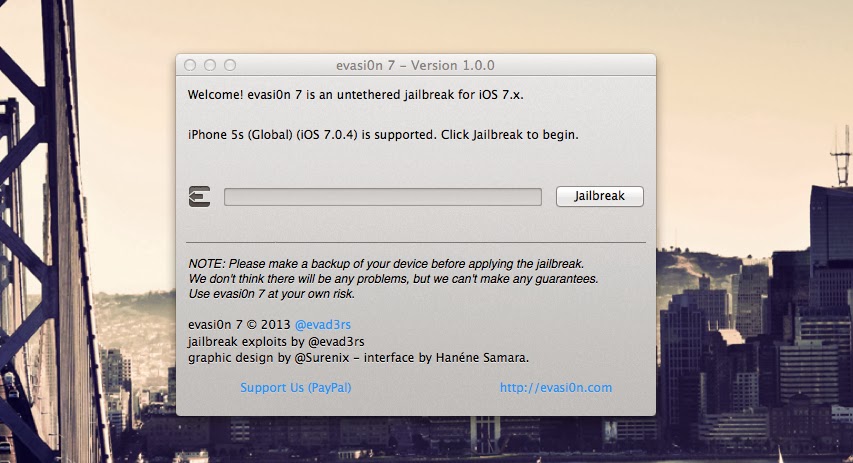
If you want make jailbreak iOS 7 - 7.0.4, you do not need special programming skills or knowledge of machine code - you just need to click one button in the IOS 7 jailbreak tool - Evasi0n7. It can make any user. New jailbreak iOS 7 tool Evasi0n7 compatible with all versions of iPhone, iPad and iPod touch. 

Practice shows that the chance of successfully hack firmware increases when installing clean OS, and not through the update function by air from Settings - > General - > Software Update. In other words, the first on the iPhone and iPad should install OS 7.0.4 - 7.0 again using iTunes 11. 

!!! You must to disable the password lock screen on iDevice.

You will need:
    * iPhone 5s, iPhone 5c, iPhone 5 , iPhone 4S, iPhone 4 , iPad 2 , iPad 3 , iPad 4 , iPad Air, iPad mini, iPad mini 2 or iPod touch 5.
    * Computer based on OS X 10.5 / 10.6 / 10.7 / 10.8 or PC with Windows XP or higher .
    * USB- cable to connect your smartphone or tablet to your computer.

How do Jailbreak iOS 7-7.0.4 for iPhone and iPad using 


Evasi0n 7:


Step 1: Download the latest version of iTunes 11 and Evasi0n7 (link above this post). Extract the archive and run it as administrator.

Step 2: Connect your iPhone, iPad or iPod touch to your Mac or PC, click the iTunes and make a backup copy of the data .

Step 3: Make sure that the password on the device is disabled .

Step 4: Evasi0n7 detects the device model . Button «Jailbreak» window becomes active , click it.

Now the application will perform hacking, reboot the device and download the installation packages . The procedure can take some time. In any case , do not interrupt the installation.

Step 5: When the screen displays the message "To continue, please unlock your device and tap the new 'Jailbreak’ icon”, 

            Unlock your gadget and get on your dagdets’s desktop a new icon «Jailbreak». Click on it. IPhone or iPad screen for a few seconds will turn white , and then will springbord .

Step 6: Evasi0n continue to jailbreak iOS 7-7.0.4: appears on the screen overhead information about the process of jailbreaking .

Step 7: When you see the message Done, the program can be closed. Now your device will reboot. Device startup process may take a long time (2 -3min) .

Step 8: After downloading, you will see the logo on a white background Evasi0n . Your device will reboot a second time.

Step 9: Congratulations, you have successfully done jailbreak iOS 7-7.0.4 on Windows or Mac! Open your iPhone, iPad or iPod touch and run Cydia!


Note: If after jailbreak iOS 7-7.0.4 arose cyclic reboot (on the iPhone or iPad for a long time, "floating" logo Apple), switch the device into recovery mode. To do this, hold the power button and the Home button simultaneously until the screen turns off while , then release the power button but continue holding Home for another 20 seconds.) Now connect the gadget to your PC and run the recovery device through iTunes.  Repeat jailbreak iOS 7-7.0.4.


Download Links : 

For Mac : Here !

For Windows : Here !
 
Blogger Templates