Ads 468x60px

Slider(Do not Edit Here!)

.

Recent Post

Recent Comments

Future Video

Populer Post

Text

1 Mart 2014 Cumartesi

Reasons for Jailbreak 2014. IntelliScreenX 7 for iOS 7

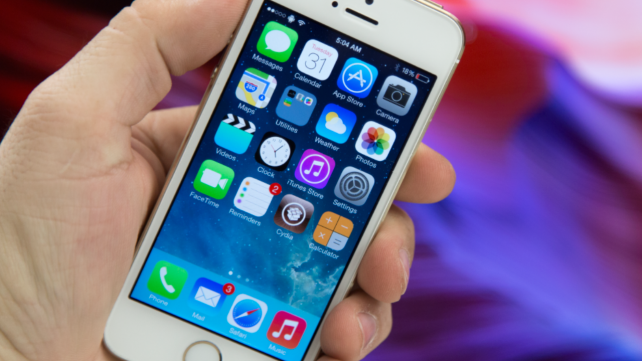
Evad3rs has released Jailbreak iOS 7.0.6 - iOS 7. Evasi0n7 1.0.6 works perfect on all confirmed iPhone, iPad, iPod Touch. You can download last Evasi0n7 update from us and install for free. We have very good news for all, who make jb on your idevices. IntelliScreenX 7 for iOS 7.


IntelliScreenX 7 turns lock screen in the center console of iOS 7. With this cool cydia tweak you can read and manage RSS-subscriptions, e-mail messages, correspondence from social networks and easily send tweets and messages. Switching between the services provided by means of a transparent panel along the right edge of the screen. It is caused by a simple swipe.

With installed on the iPhone tweak IntelliScreenX 7 users do not even have to unlock the device to get the desired information.


26 Şubat 2014 Çarşamba

One More Reason for iOS 7.1 Jailbreak


Evad3rs: jailbreak ios 7.1. Yes or No? We have one more reason for jailbreak 7.1 iOS for iPhone, iPad. Cydia tweaks creator like Auxo and AltKeyboard, announced a new version of the popular tweaks named Auxo 2. He confirmed that new cydia tweak Auxo 2, the release of which, according to him, will take place "within the next month ."

We know, that Apple released new iOS 7.1 in March.

Auxo considered one of the best jailbreak new products in 2012. Even before the announcement of iOS 7 creator of this tweak is suggested to use the multitasking bar for the iPhone and iPad instead of simple icons miniature versions of screens showing the status of active tasks , as well as multi-touch gestures. They say that with the filing A3tweaks appeared in iOS multitasking this design.

iOS 7.0.7 Confirmed


Apple released IOS 7.0.7 coming soon. Evad3rs jailbreak 7.0.7 also. Why? Today specialists FireEye, who have already proved themselves to be detected thanks to SSL- vulnerability could find another critical bug in iOS 7. This bug is incredibly important and allows attackers to clicking idevice's monitor display on using third-party applications running in the background. Moreover, such applications can already be present in the App Store.

What is most surprising is that the work of a special script is possible even on devices without jailbreak with the latest version of iOS 7.0.6 on board.

Any application with a special code capable of tracking clicking on the screen , even when running in the background. At the same time get the coordinates of the attackers , making it possible to recover the password and any other information on the basis of these data.
Nevertheless , even when you turn off the " Content Update " application can work around this limitation and track everything a user action , including pressing the physical buttons, and even Touch ID.

At the moment there is only one way to protect yourself - to be closed manually absolutely all applications running in the background.

What about jailbreak 7.0.7? Wait.

24 Şubat 2014 Pazartesi

TOP 10 New Reasons To Jailbreak

Evad3rs has released jailbreak iOS 7.0.6 for all iDevices, who can work on Apple's iOS 7.0.6. After jailbreak, you can install cydia store with new features. Today we post include information for all, who want install new cydia tweaks and addons. Ok. Let's go.  


1. CameraTweak 2 – $1.49 


2. Snapper – 99¢ 


3. ProximityCam – FREE 


4. ColorBadges – 99¢ 


5. SpotiSearch – 99¢ 


6. Gestr – 99¢ 


7. CCMeters – $1.00 


8. UIColors – $1.49 


9. Decode Camera for iOS 7 – $1.50 


10. iPadKeyboardBlur – FREE 

How To Jailbreak 7.0.6 With Evasi0n7 1.0.6


Category: Jailbreak iOS 7.0.6
Developer: Evad3rs Team
App: Evasi0n7
Version: 1.0.6 
iPhone + iPad + iPod Touch: Free [Link] (Windows & Mac)

Evasi0n7 (from Evad3rs) jailbreak utility for iOS 7.0.6 works perfect on iPhone 5s, iPhone 5c, iPhone 5 , iPhone 4S, iPhone 4 , iPad 2 , iPad 3 , iPad 4 , iPad Air, iPad mini, iPad mini 2 or iPod touch 5. You can install cydia store on your iOS 7.0.6 for free without registration.


Step 0: Make sure that the password on the device is disabled .

Step 1: Download Evasi0n7 utility from link (above), Extract .zip and Run "Evasi0n7"

Step 2: When the screen displays the message "To continue, please unlock your device and tap the new 'Jailbreak’ icon”,

            Unlock your gadget and get on your dagdets’s desktop a new icon «Jailbreak». Click on it. IPhone or iPad screen for a few seconds will turn white , and then will springbord .

Step 3: Evasi0n continue to jailbreak iOS 7.0.6

Step 4: When you see the message Done, the program can be closed. Now your device will reboot. Device startup process may take a long time (2 -3min) .

Step 5: After downloading, you will see the logo on a white background Evasi0n . Your device will reboot a second time.

Step 6: Congratulations, you have successfully done jailbreak iOS 7.0.6.

22 Şubat 2014 Cumartesi

How To Fix Big Security Problem with iOS 7.0.6


One of the worst day for Apple. Today we know that HTTPS haven't protected our credentials and privacy for 1 year. People on public WiFi networks in your schools, shops, offices and more..., please just don't use your iPhone, iPad or iPod Touch running on iOS 7.x if it's not updated to iOS 7.0.6. People (with no special talent) can grab any of your Facebook, Twitter, WhatsUp, Viber,  Mail passwords without you noticing now that they know how. The security of iOS < 7.0.6 is now so bad that I advice everyone to update quick. Hmm. All android smartphones has this problems, if you are android owner, you don't use your Android on public WiFi. Don't forget. Your passwords and credit card creds can be intercepted on networks.

"Evad3rs, What shall we do?"

If you have jailbroken iPhone, iPad or iPod Touch:

Step 1: BackUp your data
Step 2: Restore Your iDevice
Step 3: Jailbreak iOS 7.0.6 with new Evasi0n7 1.0.6
Step 4: Done. You can use your iDevices on public Wifi

If you have nonjailbroken iPhone, iPad, iPod Touch:

Step 1: BackUp your data
Step 2: Go to "Settings" > "General" > "Software Updates" > Install "7.0.6"
Step 3: Done. You can use your iDevices on public Wifi

Evasi0n iOS 7.0.6 Jailbreak


Evasi0n7 iOS 7.0.6 jailbreak has been released. 

How to make jailbreak?

Step 1: Download the latest version of iTunes 11 and offical jailbreak. Extract the archive and run it as administrator.

Step 2: Connect your iPhone, iPad or iPod touch to your Mac or PC, click the iTunes and make a backup copy of the data .

Step 3: Make sure that the password on the device is disabled .

Step 4: Evasi0n7 detects the device model . Button «Jailbreak» window becomes active , click it.

Now the application will perform hacking, reboot the device and download the installation packages . The procedure can take some time. In any case , do not interrupt the installation.

Step 5: When the screen displays the message "To continue, please unlock your device and tap the new 'Jailbreak’ icon”,

            Unlock your gadget and get on your dagdets’s desktop a new icon «Jailbreak». Click on it. IPhone or iPad screen for a few seconds will turn white , and then will springbord .

Step 6: Evasi0n continue to jailbreak iOS 7-7.0.4: appears on the screen overhead information about the process of jailbreaking .

Step 7: When you see the message Done, the program can be closed. Now your device will reboot. Device startup process may take a long time (2 -3min) .

Step 8: After downloading, you will see the logo on a white background Evasi0n . Your device will reboot a second time.

Step 9: Congratulations, you have successfully done 

Download Links ;

For Mac : Here!

For Windows : Here!

Enjoy!
 
Blogger Templates