Ads 468x60px

Slider(Do not Edit Here!)

.

Recent Post

Recent Comments

Future Video

Populer Post

Text

5 Haziran 2014 Perşembe

Downgrade iOS 8 beta to iOS 7.1.1


iOS 8 has been released by Apple. All who want to download/install new iOS 8 with new features can make it from here. But... If you don't have UDID registration or Developer account, you can downgrade iOS 8 to iOS 7.1.1 for all iOS 8 confirmed idevices. How? Yu can see this complete guide from us: 

Step 1: Turn the device off, connect it to the computer via USB, and launch your last version iTunes
Step 2:  Place the iOS 8 beta device into DFU mode: with the device off, hold down the Power and Home buttons together for 10 seconds then release the power button, continue holding Home button until iTunes notifies you of a device in recovery mode being detected. The devices screen should stay black as if turned off.

Step 3: Restore within iTunes through either method a or b:

a) Restore from the iOS 7.1.1 backup you made prior to installing iOS 8 beta
b) Restore to iOS 7.1.1 IPSW by Option-Clicking the “Restore” button, and then restore from iCloud backup when finished

Step 4: Let iTunes restore back to iOS 7.1.1, the device will reboot when finished

Enjoy!

3 Haziran 2014 Salı

iOS 8 Beta 1 Features!


Apple executives introduced the next version of its mobile operating system - iOS 8. All roughness of the previous "Seven" that so much an eyesore , suddenly disappeared in the new update, and their place was taken by new opportunities with unique features within iOS. Even the wild , because imagine a mobile OS from Apple and third-party widgets keyboards to this day I could not

During the conference, the scene voiced phrase «iOS 8 - this is the biggest release of iOS». And if all graphically just got to look a little more subdued , with fewer dynamic animation in iOS 7, the functional things have changed .

Photo


Along with the new rates for cloud storage feature was introduced iCloud iCloud Photo Library. Now all the pictures and videos can be stored in the cloud, there to create albums , edit them , and look at this store and according to locations.

Standard means of image you can now make candy . For example, right in the app "Photo" have the opportunity to align the horizon qualitatively or crop the photo . Here a few of Taps can set the shutter speed , brightness, contrast and more.

There is even photographic filters as in Instagram. Along with iOS developers Photoprogram 8 from the App Store will be able to develop your own filters to the standard application , you simply need to give the go-ahead to use them , tap on the window appears .

The standard Camera application appeared tab Time-Lapse. It is a new mode that lets you capture interesting scenes in the new accelerated format.

Messages


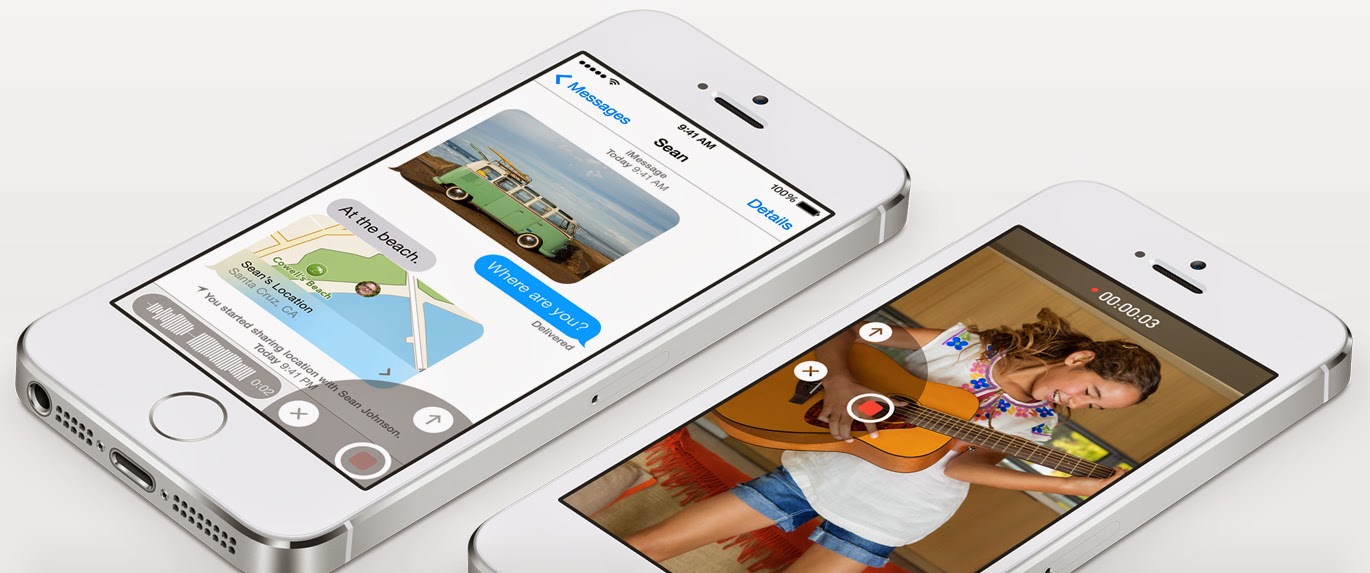
New application "Messages" - it's a killer of all existing messengers of App Store, as WhatsApp, Telegram and others. Let it not happen so quickly, but all to go . Judge for yourself . For example, in the program now have the ability to send instant audio messages . Video, we also can send .

Chats in the "message" is also created in the image and likeness , for example , WhatsApp, only with simplicity and minimalism inherent developers of Apple. Chats can now call it, add / remove buddies or function include "Do Not Disturb" if chat turned to mush from messages. Do you want share location? Easily. DO you want send several photos, videos, audio files? Too easy, they are also lined up in a nice gallery.

Keyboard


8 appeared in iOS predictive text input when the screen falls possible words , when you type the first few letters. The system will not just pour a huge amount of options , no, she's smart. So your iPhone when issuing words will always know whether you are communicating with one another in a message or send an important letter boss.

And most important - Apple has opened the way to the App Store side of the keyboard , so get ready to experience on your iPhone strength and power technology fast typing Swype. Of multiple keyboards in the system can be selected as the main one .

Family Sharing


Family sharing - another functionality that was asking for several years. And boom! It is now available on iOS 8. Now to one account can connect up to six family members and co-buy software, applications, music and more with the same credit card. No longer need to give someone your accounts and passwords, just add a person and you will receive an automatic notification that this person is trying to buy something with your account.

Other built-in programs will also be displayed together with the users of the same account information. For example, will be divided into Photostream photos of each family member can be put on the calendar alert for individuals, as well as watch their location on the map.

iCloud Drive

iCloud Drive - USB flash drive is a cloud with a large volume on which to store any files. In general, as DropBox, only cooler. More information on this functionality can be found on apple home page.

Health


New Health standard application will be the center of all sports applications and software for tracking health. It will store all the information that may be available to your doctor . I understand at the moment is a project - germ, which soon will be actively developed with the help of software developers in the App Store


iOS 8 Review: On iOS, 8 had such a useful system interactions with OS X, when you do not have to approach the iPhone, and Mac can be a conventional headset , smart dropdown notification , comfortable gestures in the mail, a list of favorite contacts in the list of running applications, and much more . Changes just a million and they will be presented in our traditional large-scale survey iOS 8 with screenshots and videos. The system is already actively tested on iPhone 5/5s.

iOS 8 Beta 1 Download links WITHOUT UDID

iOS 8 Beta 1 Download Links:  

Uploaded.

iPhone:
iPhone 5s (Model A1453, A1533)  - LINK
iPhone 5s (Model A1457, A1518, A1528, A1530) - LINK
iPhone 5c (Model A1456, A1532) - LINK
iPhone 5c (Model A1507, A1516, A1526, A1529) - LINK
iPhone 5 (Model A1428) - LINK
iPhone 5 (Model A1429) - LINK
iPhone 4s  - LINK

iPod Touch 5G - LINK 

iPad:

FOR ALL iPAD MODELS CLICK HERE !

How to install iOS 8 Beta without UDID registration? 

Step 1: Connect your iDevice with iTunes via USB.

Step 2: Restore your iPhone, iPad or iPod touch to iOS 7.1.1 via iTunes, then setup it as a new iPhone

Step 3: Download iOS 8 Beta 1 for your iPhone, iPad or iPod touch

Step 4: Now your are requested to hold SHIFT and left click on “Check for Updates” on iTunes, then select iOS 8 beta 1 which you downloaded on Step 3, wait for few minutes and enjoy iOS 8


1 Haziran 2014 Pazar

Are you ready for WWDC ? iOS 8 ? -iOS 8 Beta-


Apple's sixth annual worldwide developers conference will take place in San Francisco for five days from 2 June with iOS 8 and the latest version of Mac OS X set to be unveiled.Apple
Apple's Worldwide Developer Conference is always much more interesting that the company's iPhone or iPad events. While those may be big on shiny new gadgets, WWDC is about software and the direction the company is heading.
This year promises to be no different, with Apple set to showcase iOS 8 and the latest version of its desktop software, OS X 10.10 in San Francisco next week but it could have much more up its sleeve.
From a new home automation platform to the possibility of the reveal of the much talked about iWatch, WWDC 2014 promises to offer a glimpse into what direction Apple will be taking for the next decade.
When and where is WWDC taking place?

About 5,000 Apple software developers will gather in the Moscone Center in San Francisco from this Monday, 2 June until Friday 6 June to discuss all things Apple.
The whole thing kicks off at 10am local time with the traditional keynote address from CEO Tim Cook and a plethora of his executives. This is when all the big announcements will be made.
Below is a list of local times for when the event will take place around the world:
  • San Francisco - 10am
  • New York - 1pm
  • London - 6pm
  • Amsterdam - 7pm
  • Johannesburg - 8pm
  • Bangkok - 1am (Tuesday)
  • Hong Kong - 2am (Tuesday)
  • Seoul - 3am (Tuesday)
  • Sydney - 5am (Tuesday)

Can I watch it online?

You never quite know with Apple whether or not it will be providing a live stream of its events, but thankfully for those of us unable to make it to WWDC, the iPhone maker has already announced that it will provide a livestream of Tim Cook's keynote.
However, it's not as straightforward as logging on to Apple's website to watch the event - that would be too simple.
  • Desktop/laptop - In order to be able to watch the event on a desktop computer you will need to use the Safari 4 or later running on OS X 10.6 or later.
  • Mobile - For iPhones or iPads, you will need to use Safari running on iOS 4.2 or later. If you are one of the billion Android smartphone and tablet owners, well this is probalby not of interest to you anyway.... 
  • TV - The event will also be streamed live on Apple TV, but you will need either the second or third-generation Apple TV with software 5.0.2 or later.
So essentially, unless you have an Apple product to hand, you are out of luck. That said there are likely to be numerous 'alternative' streams popping up on other sites which are easily accessible through other devices.


iOS 8 Beta Dowload Links Will Be Here After WWDC 2014!

iOS 8 Features , You Should Know-

iOS 8 UDID Registration-

iOS 8 Timezone-


Follow Us For All iOS 8 Beta & Features!
iWorld-iPhone.blogspot.com
28 Mayıs 2014 Çarşamba

iOS 8 Supported devices (Complete List)

iOS 8 coming in summer. WWDC 2014 confirmed - official iOS 8 release date for beta 1 download links - 2-th June, 2014.  We have one big question. What devices are iOS 8 compatible? Will Apple's iOS 8 work on my iPhone? Which devices supported? 


According to rumors.: these are the officially supported iOS 8 devices:

iPhone 4S
iPhone 5
iPhone 5S
iPhone 5C
iPad 2
iPad 3
iPad 4
iPad Air

iPad Mini
iPad Mini 2

iWatch !?

Tim Cook admitted that currently being developed some new types of products, but it is time to pull off the veil of secrecy from them did not come. Nevertheless, these new solutions to Apple very proud.

Cook justifies the long wait for new products that sometimes training products for the announcement is delayed, and be the first time display new items on the market - it is not the main task of Apple. Apple wasn't the first in the case of the iPod, iPhone and iPad - players, smartphones and tablets existed on the market prior to their appearance. However, it is Apple products corresponding categories were among the best on the market. Much more important, according to Cook, do something right and not do it first.

4 Nisan 2014 Cuma

iOS 8 Release Date - Timezone


Did you miss the activities from Apple? Want to know how it will look iOS 8? :)

iOS 8 download links release date for all iDevices - 2-th June. Cool. iOS 8 beta 1 download links will be works for both Mac and Windows, and is considered to be one of the most reliable iOS by the whole iOS community. You can download iOS 8 beta from evad3rs.net for free.

Apple will open the season interesting announcements and products in the traditional time. Apple officially announced the date for the annual event Worldwide Developer Conference, abbreviated WWDC. We are waiting for the start of summer - June 2.

Developers can apply to buy tickets right now and until April 7. Unlike previous events, Apple will distribute the right to purchase tickets at random. This - response to the events of last year, when WWDC 2013 tickets were sold out in 2 minutes.

What is so interesting WWDC 2014? Apple technology users with experience know that at this event is traditionally represent the latest version of operating systems - iOS and OS X. A one year ago, exactly on WWDC'13 we saw the first iOS 7 features.

This year we will learn how to look - and what will boast - iOS OS 8 and 11. Should not expect high-profile announcements of brand new devices: experience shows that such events occur in the fall. We look forward to!

------->  IOS 8 DOWNLOAD LINKS <--------

------->  UDID Registration for free <----------

Don't forget: download links will be + 2 hours after WWDC 2014. 


How To Install With UDID Registration For iOS 8

If you found iOS 8 download links (direct links, torrent or on Mega), don't forget, that if you want install new iOS 8 on your confirmed iDevice (iPhone or iPad), you must read this post. We can help us.  


Waiting for iOS 8? This summer you can put iOS 8 beta 1, 2 ... 6, without waiting for the official release in the fall. Certainly we can expect something interesting in new iOS 8. Many innovations, stability and development of the system. 

To install the iOS 8 beta 1 on the first day of its release you must register your UDID.

You can do it on our website evad3rs.net. We have the best solution for you: professional advice and support of users, help with updating, fast execution of applications, warranty registration of your UDID. We do it all for free.

iOS 8 download links 

How to install iOS beta 8 and did not get a non-working device? 

DO you have problems like "Activation error / Activation error» and the display shows "register your device in iPhone / iPad developer program portal»? 


We offer registered UDID developer account at Apple, that will allow you to install the latest versions of iOS 8 beta, and the final version of iOS 8. Without the risk of losing all the data and get a brick. 
Quickly. Reliably. Safely. 
 
Blogger Templates